2026 Run Bournemouth Weekend

Event Spectator Information Pack

Sat 10th October 2026 - Sun 11th October 2026


Welcome Pre-Event Info Event Day Info

Welcome

Welcome

The information below will help plan your day out at the Run Bournemouth. All spectators are encouraged to cheer on participants from the start, on the course, and at the finish. It definitely helps the participants keep moving when the going gets tough.
The Run Bournemouth event takes place against the stunning backdrop of golden sands and the sparkling blue waters of the English Channel, this event is not just a race-it's an exciting adventure for children of all ages, friends and family. The Run Bournemouth start at different times, so make sure you check the Key Times section, so you don't miss whoever it is you are supporting.

So get your banners, cowbells, flags, and balloons ready, and we'll see you there on Saturday the 11th of October! 

Questions

If you have any questions, we have developed an extensive FAQ section to help with event queries.

Plan Your Travel

We strongly advise that you use public transport or our pre-booked event buses to travel to/from the Start and Finish areas. All the event buses are fully accessible. Please note that only assistance dogs are permitted on board. 

Please view the Run Bournemouth Transport Information and plan your travel arrangements accordingly. If you plan to pre-book event buses to travel to/from the Start and Finish areas, please visit the Run Bournemouth shop and purchase a bus ticket.

Please note: National Entitlement Cards cannot be used on Event Buses.

Top Spectating Tips

  • Research the route: Know the route, including start and finish locations, key landmarks, and viewing spots along the way. Check for road closures and transportation options.
  • Check the weather: Monitor the weather forecast for the day. Dress appropriately and pack extra layers or rain gear if needed.
  • Plan your transportation: Determine how you will get to and from the different locations. Check the transport section for further advice. 
  • Pack essentials: Bring essentials such as sunscreen, hats, sunglasses, comfortable clothing and shoes, water bottles, snacks, a portable chair or blanket, and any necessary medications.
  • Charge your devices: Ensure your phone or camera is fully charged. Bring a portable charger to capture photos and videos throughout the day.
  • Create spectator signs: Make colourful and encouraging signs to cheer on the runners. Include personalised messages or funny slogans to uplift their spirits.
  • Coordinate with others: If spectating with a group, plan meeting points and communication methods in case you get separated during the event. 

Key Times and Locations

09:00 | Run Bournemouth 10K 

11:00 | Run Bournemouth Half Marathon 


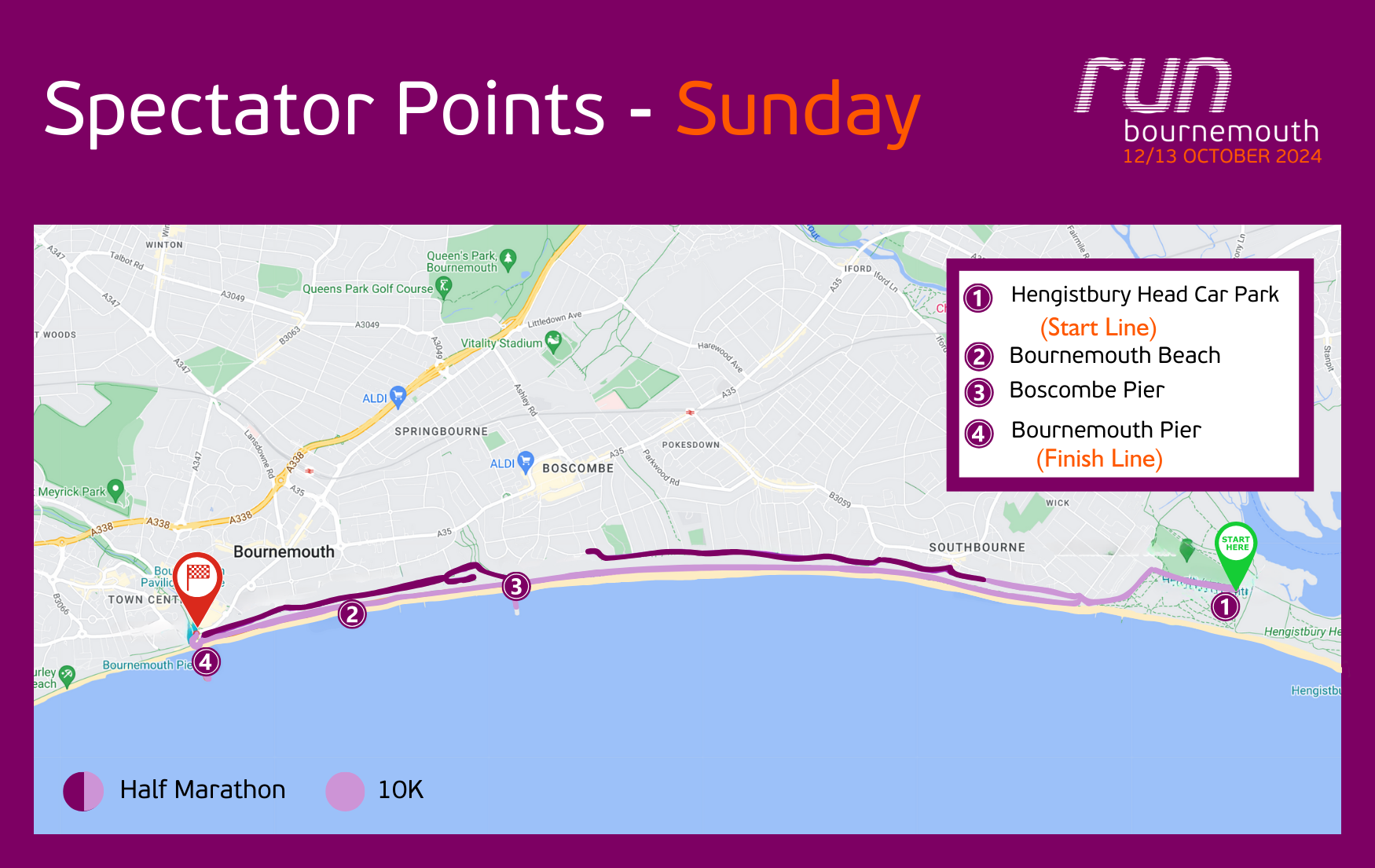
Spectator Points


1. Hengistbury Head Car Park (Start Line)

What3words: format.pure.head

As the starting point of the event, Hengistbury Head Car Park provides an exciting atmosphere for spectators to see the runners set off on their challenge. Nestled in a beautiful natural setting near the Hengistbury Head Nature Reserve, it's a great spot to witness the start of the event and enjoy the surrounding coastal scenery. Ample parking and nearby facilities make it convenient for supporters.

2. Bournemouth Beach

What3words: having.stable.goal

The iconic Bournemouth Beach provides a scenic location to watch the event unfold, with plenty of space to relax while enjoying the coastal views. A perfect spot to support the runners along the route while taking in the seaside atmosphere.

3. Boscombe Pier

What3words: vivid.point.plank

A quieter alternative to Bournemouth Pier, Boscombe Pier offers a more relaxed environment for spectators. Positioned along the course, it provides excellent views of the runners as they pass through, with a range of nearby cafes and facilities.

4. Bournemouth Pier (Finish Line)

What3words: mull.audit.float

Located at the heart of the event, Bournemouth Pier offers a vibrant atmosphere with great views of the runners near the finish line. With nearby catering facilities and easy access to amenities, it's an ideal spot for spectators to cheer on the participants.


Event Maps

Food, Drink & Facilities

Catering facilities will be available near the finish area, adjacent to Bournemouth Pier, offering a selection of snacks and beverages for spectators to enjoy while supporting the runners during their challenge.

Live Tracking

Our events do not use live tracking, however there are many other ways your family & friends can track participants:


1. Strava Beacon 

Compatibility: Apple and Android

Strava Beacon allows runners to share their real-time location with anyone they want. When Beacon is activated, the runner can go into the Strava app and select any contacts they want to send a notification text to with their location. 

The link sent to you via text will open in a browser, so you don't need to have the Strava app, or be a Strava user, to see your runner. 

To find out more, visit the Strava website.


2. Find My 

Compatibility: Apple 

The "Find My Friends" app is available on iPhone and allows users to share their location with friends and family members Here's how it works:

The runner can choose to share their current location with specific individuals for a set period of time or indefinitely. They have control over who can see their location and can customise sharing settings for each person.

The runner can send invitations to friends or family members to share their location. Once the invitation is accepted, you'll see each other's real-time location on a map.

To find out more, visit the Apple website.


3. Google Maps 

Compatibility: Apple and Android

Google Maps offers a feature called "Location Sharing" that allows users to share their real-time location with others. Here's how it works:

Access: The runner open Google Maps, navigate to the menu, and select "Location Sharing."

Sharing: The runner chooses contacts to share their location with and sets a duration for sharing.

Real-time tracking: You will receive a notification and can view the runner's real-time location on a map.

To find out more, visit Google Support.


4. Whatsapp Live Location

Compatibility: Apple and Android

Live Location allows you to share your real-time location with the members of an individual or group chat.

  • Open an individual or group chat.
  • Tap attach > Location > Share live location.
  • Select the length of time you'd like to share your live location. Your live location will stop being shared after the selected amount of time.
  • You can also enter a comment and emoji.
  • Tap send.

To find our more, click here.